Monday, January 3, 2022

Chapter 3: Computer software and Operating System

Software - Introduction:

As we know stand alone hardware cannot do nothing, for the smooth operation of our Computer System there should be proper coordination between hardware and software. Software helps to mobilize the hardware and other  resources. In order to mobilize hardware we have to write several set of instruction which instruct computer  what to do, what not o. These set of instruction are collectively know as program and the term software is the collection of related programs and  associated documents. In Order to produce useful output, hardware and software must work together. Nothing useful can be done with the hardware only and software cannot be utilize without hardware. The different types of software are:

1) System software: System software is set of one or more programs designed to control the operation of our computer system. This type of software doesn't fulfill the specific requirement of the user. They are general program written to assist human in the use of the computer system. In general system software support the running of other software, communicate with peripheral device, support the development of other types of software and monitors the use of various hardware resources. Thus, the system software makes the operation of the computer system more effective and efficient. The system software is categorized into two categories.

1.1) System Management: It is responsible for proper management and functioning of the computers system. All types of management between computer hardware and software is performed by system management software. There are 3 types of system management software:

1.1.1) Operating System: Operating system is a collection program that controls the overall operation of the computer system. It is the 1st program that is loaded into memory when the computer is turned on. It provides platform for other application program to run and execute. It provides user with an interface so that uses can easily communicate with computer. For example Linux, Windows, Mac etc

1.1.2) Utility software: It is the supporting software which is used to perform specific task related to the maintenance of the computer system. Some  of the utility software are included in operating system where as some are available as separate utility in market. They are also called service program. For example  Norton Utility, PC tools, win zip etc

1.1.3) Device driver: A device driver is a software which is responsible for smooth functioning of the hardware device that is connected to the computer. When we add a new  device to the computer, we need to install new software called device driver. Device driver will co-ordinate with the operating system and the newly installed hardware functions properly and smoothly.

1.2) System Development: It refers to set of programs that are use to develop computer program. This type of software are not used by a normal user of the computes. They are used by programmers for the development of new program. There are two types of system development software:

1.2.1) Programming language: The language with which we give instruction to the computer is known as programming language. Programming language are the set of different keywords, variable, operators, loops and other symbols etc. They help to make communication between computer and user. These are two types of programming language low level language and high level language.

1.2.2) Language translator: It is a special kind computer software which translates the programs written one language in another language. It is compulsory for both low and high level language. It is also called language processor. The types of language translator are compiler, interpreter  and assembler.

2) Application Software:  Application software is a set of one or more program which are design to do a specific task. It is made to fulfill the user demand. This program directs a computer to solve user oriented problem such as preparing bills,  calculating mathematical equation, preparing mark sheet etc. The software that are develop for user purpose is called application software.These types of software are generally develop by using high level language. for example Ms-Excel, Photoshop, Billing software etc. There are two types of application software.
 2.1) Packaged software: They are the generalized set of programs design and develop for general purpose. It is generally large sized, error-free, advance and standard software with much more functionality fir especial work. This type of software doesn't perfectly match the requirement of many organization or user. They cannot be changed easily are developed and designed by reputed software Company so they are trust worthy. They are expensive for small organization. for example Ms-Office, Adobe, Macromedia etc.

2.2) Customized /Tailored software: This is a software develop in high level language for special task. This types of software is developed for some specific purpose for solving specific problem of specific user or organization. The requirement on the user or organization can be perfectly matched. They can be changed easily since they are made by local programmer. for example: payroll system, inventory management, school management, billing software, mark sheet evaluation etc.

Operating system - Introduction

An operating system (OS) is an integrated set of program that controls overall resources such as CPU, memory, input-output device of the computer system. The major objective of operating system is to improve the performance and efficiency of a computer system. Like the manager of a company, an operating system is responsible for the smooth and efficient functioning of the entire computer system. The operating system provides the platform for other application program/software to run and execute. It provides user with an interface so that user can easily communicate with computers, which is more convenient to use and operate.

An operating system is a collection of program that controls the overall operation of the computer system. It also controls and co-ordinate the use of hardware, among the various application program for various user. So, it act as an interface between user and the computer hardware. The other major functions of operating system are:

  1. It controls, monitor and co-ordinate overall operation of our computer system.
  2. It act as an interface between user and computer.
  3. It provide platform to develop, run and execute other computer program.
  4. It manages hardware resources such as CPU,  memories, input-output terminals, networking equipment etc.
  5. It hides programming and hardware complexity to the user.

    The primary goal of an operating system is to maximize the productivity of a computer system by operating it in most efficient manner and maintaining the amount of human intervention. Some example of operating system are: MS-DOS, Windows, LINUX, MACOS, UNIX, Chrome, Fedora, Ubuntu etc.


Functions / Features / Advantages of Operating System (OS) - V.imp

1) Input-Output (I/O) Management: Input-Output is essential to operate any computer. It allows computer to interact with several peripheral devices such as keyboard, mouse, printer, scanner etc.

2) User Interface (UI): User Interface means an ideal environment in which user can work on it so that s/he can interact with the computerized system. Every operating system provides the feature of user interface in order to enhance the experience and joy of using computer or any other computerized system. It act as a bridge between user and computer. There are 2 types of user Interface.

  • Character/Command User Interface ( CUI ): Eg MS-DOS
  • Graphical User Interface (GUI ): Eg Windows, MAC OS

3) Security: The operating system of a computer has a number of built-in tools  to protect against security threats such as viruses, unauthorized access, suspicious network activity etc. The basic security in a OS is to control access to your computer by setting users and password.

4) Process Management: The process management allocates a processor to execute a chosen process. OS acts as a traffic controller, job scheduler, process scheduler and dispatcher.

5) Memory Management: Memory is a large array of bytes, each with its own address. When the user request CPU for read-write operation. OS determines the amount of memory required for the program instruction and data. Then OS allocates required memory to load the program and  data into RAM. When the program terminates it freeze up the space and new program is loaded.

6) Data Management: Data management allows organizing their data into logical grouping called files.Earlier Operating system does not provide features of data management. Hence, they were inflexible but nowadays, every operating system provide this feature.

7) Command Interpreter: The command interpreter reads the command that a user types in at a terminal, interprets them and translate them into detail set of instruction that computer hardware can understand. Every operating system must have command interpreter for its operation.

8) Dead-Lock prevention: During processing a situation can arise in which a resources shared by two or more process cannot continue because the resources required by a process is held by other. This situation is known as dead lock. For eg. If process-1 allocates resources A and later required resources B and process-2 allocates resources B and later requires resources A. In this situation neither process-1 nor process-2 will be executed. Such situation is called deadlock. Operating system ensure prevention of deadlock by taking situation action by careful allocation of resources.

9) Time sharing: The function of OS that involves CPU to allocate time in a number of user on same computer. This property generally found in network operating system such as windows NT.

10) Virtual Memory: Virtual memory is the feature of an operating system that allows a computer to compensate for shortage of physical memory by transferring temporary files from RAM to disk. Virtual memory has twice as many address as main memory. The process of translating virtual address into real address is known as mapping. The copying of virtual pages from disk to main memory is swapping.

Types of Operating System (OS) - V.imp

Types of Operating System (OS)

Basis of ProcessingBasis of User Interface (UI)Basis of mode of user
Multi programming OSCharacter User InterfaceSingle user
Multi tasking OSGraphical User InterfaceMulti user
Multi processing OS  
Time sharing OS  
Batch processing OS  
Multi threading OS  
Online processing OS  
Real time OS  

A) On the basis of processing

  1) Multi-programming OS: Multi-programming is used in multi-user environment. It is the technique in which multiple user program are executed simultaneously by single processor.  Multi-programming means when two or more than two program are provided to the CPU for processing or loaded in the internal storage of CPU at the same instant of time. From the loaded program once the portion of one program is executed and the portion of another program is executed and so on. Thus, multi-programming refers to concurrent execution of several program. The main purpose of multi-programming is to increase the utilization of computer and its resources. Different forms of multi-programming OS are multi-tasking, multi-processing and multi-user.

 2) Multi-tasking OS: Multi-tasking OS allows more than one program to run concurrently mainly in a single user system. These computer are capable of executing several tasks or program at the same time. For executing several task it can be single or multi-processing system. In some multi-tasking system one of the process is called fore-ground (active) other are called background (inactive). Multi-tasking OS increase the productivity of the user by executing many task simultaneously. Some of the most common example are MS-Windows, Linux, MAC OS etc.

3) Multiprocessing OS: Multi-processing system has more than one processor linked in a coordinated way. Multiprocessing OS supports running a program in more than one CPU. Generally, super server are especially designed to support multiple processor. UNIX is commonly used multi-processing OS. Multi-programming and multiprocessing are no the same concept. Multi-programming involves concurrent execution of two or more programs by a single CPU, whereas multi-processing involves two or more processor (CPU) for controlling the different activities or execution of many program simultaneously. Multi-processing concept is also known as parallel processing. It is more costly and complex technique the multi-programming which dramatically increase the program execution speed of computer.
 

4) Time-Sharing OS: Time sharing is a technique which enable many people located in various terminal to use a particular computer system at a same time. Processors time which is shared among multiple user simultaneously is termed as time sharing. Multiple jobs are executed by the CPU by switching between then, but the switches occurs so frequently that user can receive a immediate response.
 

Advantages:

  • Provide quick response.
  • Reduce CPU idle time.

Disadvantages:

  • Problem of reliability.
  • Less security.
  • Integrity.

5) Batch processing OS: Batch processing is a technique which requires grouping of similar jobs, which consists of program, data and system command. It is also known offline processing. This type of processing is suitable in program with large completion or involvement. For example, Payroll, Weather forecasting, Statistical analysis and many more. User need not wait while the job is being processed. They can submit their program to the operator and collect them later which means, the jobs are entered stored on a disk in a batch or queue and is executed one after another under the control of the OS.

    Major disadvantage of batch processing is that it does not allow interaction between user and program during execution.

6) Multi-threading OS: A program in execution is known as process and can be divide into multiple smaller sub process. This sub-process are known as thread. Multi-threading OS has the ability to divide process into threads and execute them concurrently. Threads are individual process that execute simultaneously in multi-tasking OS.

7) Real time OS: Real time processing method is one that controls environment by receiving data and taking action quickly to affect the functioning of the environment at the same instant of time. It is an online processing system in which processing time is critical. The entire processing task has to be completed in the predefined time. The real time OS is suitable for following type of operation.

  • Airlines or flight seat availability.
  • Rocket Launching system
  • Whole sell supplier and manufacturer. etc

8) Online processing OS: It is a popular processing technique at present. In this method transaction are processed as soon as it happen at the place of its origin. It is quite simple compare to real time OS. In this type, user can interact or provides input during processing as well. The output is provided back to the user as soon as processing is completed.

B) On the basis of User Interface ( UI )

 A user interface allows user to interact with the computer system. It provides user with an ideal environment so that user can experience better computing. It brings structure to the interaction between user and computer. Without user interface it is almost impossible to operate a computer smoothly. Hence, in order to enhance the experience of using computer, UI plays vital role. Mainly there are 2 types of User Interface (UI).

  • Character User Interface (CUI)
  • Graphical User Interface (GUI)

1) Character User Interface (CUI): It is a type of operating system in which whole computer operates or depend upon the command issued by user. All the operations that take place in CUI have their own specific command. Hence, they are known as Character User Interface. User have to remember all the command need to operate the computers. So, they are non user friendly. Only the people people having technical knowledge would operate this type of operating system. It is primitive type of OS, in which graphics, pictures, icons, drop-down menu, dialogue box etc are not used which make it more difficult to use. It uses the character or text mode of computer such as DOS and UNIX. A command prompt is a sequence of character used in CUI. Commands are typed in to instruct computer. MS-DOS is a Character User Interface operating system.

The major advantage of this type of OS is they can have quick response as long as user enters correct command whereas, the disadvantages of command driven User Interface is that, they are very difficult to use if the user is beginner and doesn't know correct command. However, it can be used in older system with no processing capabilities and low storage.

Features of CUI

  • It is single user and single tasking operating system.
  • Less user friendly than GUI.
  • Commands are used to instruct the computer.
  • User needs to remember the command for operating this system.
  • It cannot display graphics, icon, pictures and multimedia.
  • It is faster then GUI system
  • Pointing devices such as mouse, joystick, track-pad are not recognize.
  • It can be used in low memory and low processing computer.

2) Graphical User Interface (GUI):  It is a type of operating system in which computer are operated just by clicking or selecting the required icon or dialogue box instead of writing a direct command to the system. Since graphics like icons, pictures, drop-down menus, dialogue boxes etc are used which makes it more user-friendly than CUI. Since, user doesn't have to remember a single command, every user without technical knowledge can also use this type of OS. Due to user friendly interface, they are simple to use and widely used for domestic application. The goal of graphical operating system is to create a system that the computer user can turn on and operate in right way without any training or by remembering commands. The main advantages of GUI is that they are easy to use especially for beginners. The main disadvantage of GUI is they consume more memory for operation.Windows, MAC OS etc are the example of GUI.
The first Graphical User Interface was designed by Xerox corporations Palo's Alto research center in 1970's, but it was not popular whereas in until the 1980's the emergence of Apple Macintosh that use GUI became popular.

Features of GUI

  • It is user-friendly. So, it is easy to use.
  • User don't have to remember supports full multimedia and animation.
  • It requires larger memory for its processing.
  • GUI environments supports full multimedia and animation.
  • It can be used in network environment.
  • It is multi-tasking, multi-programming, multi-user operating system.
  • Every type of peripheral devices can be used.

GUI environment have following basic components.

Icon: Icons are the small pictures that represent commands, files or windows.

Pointer: A symbol (usually angled arrow) that appears on the display screen and that are moved to select objects and commands. They are controlled by a pointing device such as a mouse, track pad, light pens etc.

Desktop: The area on the display screen where icons are grouped is refereed as desktop.

Windows: Windows are displayed on screen and we can change their shape and size at will. Each windows can run a different program or display different information.

Menus: Most graphical user interface let us to execute commands by selecting a choice from a menu.

Folders: Graphical representation of a directory.
 

Differentiate between Character User Interface and Graphical User Interface [ CUI v/s GUI ] V. imp 
 

Character User Interface [ CUI ]
 
Graphical User Interface [ GUI ]
 
In CUI has to interact with the applications by making use of commands.
 
It is a user interface in which user interact with applications by making use of graphics
 
CUI stands for Character User Interface.
 
GUI stands for Graphical User Interface.
 
In CUI only one task can run at a time i.e. Single tasking
 
In GUI more than one task can run at a time simultaneously.
 
It is not user friendly interface.
 
It is very user friendly interface.
 
The user do everything by using commands.
 
Everything are interacted by pointing the application using devices like mouse.
 
Faster than GUI.
 
Slower than CUI.
 
Older computers were operated on CUI.
 
Modern computers use  GUI.
 
eg DOS, UNIX etc
 
eg, Windows, MAC-OS


C) On the mode of user: 

There are two types of OS on the basic of mode of user.

  • Single User.
  • Multi User.

1) Singe User: A single user OS is a type of OS that is develop and intended for use on a computer or similar machine that will only have a single user at any given time. This is the most common type of OS used on a home computer as well as on computer in office or other work environment. There are two general type of single user system. Single user single tasking and another is single user multi tasking. The example of single user single tasking are not much ore feasible for general purpose computing. For eg MS-DOS, PC-DOS etc

2) Multi User: Multi user OS is computer operating system that allows multiple user on different terminal to access a single system with one OS  in it . A multi user OS differs from a single user system on network, in that each user is accessing same OS at different machine. The multi user OS shares computer resources among different users, allowing each user a small slice of the processor time. This concept is also known as time sharing. Due to that, it gives the user the impression that they are all being served simultaneously even though the OS serves them one at a time for example: Linux, UNIX etc.

Some important Operating System in use:

Open source Operating System: Open source generally refers to those applications which source code is freely available in the internet to the world wide user. Basically, the software that falls under general public license are open source software. User can customize the source code of the open source software according to the user requirements. They need not buy the license to use the software. Source code can be modified and re-distributed to any other person legally. This software are free of cost. Some of the examples of Open Source Software are Linux, Unix, Mozilla, Apache etc. Similarly, Open Source operating system are those operating system whose program code are open to all the user. Some common examples of open source operating system are Linux, Unix, Minix, Open Solaris etc.

UNIX: UNIX is a powerful flexible and manageable operating system with good utilities and communication abilities. It is multi-user, multi-tasking and multi-processing operating system. It is used in bigger size machine like mainframe and mini computer. It was develop by AT&T Bell lab around 1970 AD. UNIX is developed in C and Assembly language. The development of the UNIX has given birth to many operating system such as Linux, Solaris etc. These operating system inherits its main feature from UNIX.

Linux: It is open source powerful UNIX based operating system, that can run on variety of platform including Intel, Power PC, DEC Alpha processor as well as multiprocessing system. It was developed by Linux Torvalds at the university of Helsinki as a college project. He release the version of Linux including all the source code. It is user develop product, meaning that user around the world who ran this OS for their own use have develop many of its components and drivers. It is multi-user, multi-tasking and multi-programming OS mainly popular for server system. It is distributed through different distributor such as Red Hat, Open USE, Ubuntu, Fedora, Debian, Granular Linux, Mandriva etc

MAC OS: MAC OS is a popular GUI based OS for Apple Inc. It is used in Apple Macintosh computer. It has very high quality graphical user interface. Earlier version of this OS were only compatible with motorola 68000 series of processors but now they are compatible with Intel processors also.

Some terminologies related with OS.

Spooling: These process is used to balance the difference in speed of high speed CPU and slow speed input-output device. It is primarily  used for printing purpose. When we provide multiple file to print to printer together, although printer can print one file at a time. But, all file get lined up in a queue and get printed one by one. In this process, CPU remains free and user can work on other application. These technique of printing is possible through a capability of operating system known as spooling. The term spooling is derive from the term SPOOL ( Simultaneous Peripheral Operation On Line ).

Process: A process is basically a program in execution. It doesn't mean a program. Program itself is a static while process is dynamic. For simplicity we can define program as a job that resides into the secondary storage ( which is not loaded in main memory ). A process is a program which is currently in running or ready state ( which is loaded in main memory ). A process in a computer maybe in a different possible state.

  • Running state: A process is said to be in running state if it is currently running in the processor.
  • Ready state: A process is said to be in ready state if it is temporary stopped to let other process run in the processor.
  • Blocked state: A process is said to be in blocked state if it is unable to run until some external events happens.

Thread: A single process is divided into multiple sub-process and even once of process goes for input-output operation another piece of same process start executing. This minimize the burden of context switching to some extend. When multiple process are loaded in a memory at once. When one process goes in blocked or ready state, another process is chosen by the scheduler to be in running state. During this phase, the current state of previously running process must be stored somewhere, so that it can resume from that state at the next time. This mechanism is known as context switching. It is very costly operation and it reduces efficiency. To solve such problem newer operating system use the mechanism of threading ( Light-weight process ).

Scheduling: When more than one process are run the operating system must decide which one to run first. This part of OS concerned with this decision is called scheduler and the algorithm it use is called scheduling algorithm. Scheduling can be two types.

  • Priority scheduling: Each program or job is assigned with a priority set to the program. In this scheduling job or program having highest priority are treated first or selected to run. The only demerits of this scheduling that small job may have to wait for longer period of time due to having less priority.
  • Time-sharing scheduling: Each program loaded in a memory are given fixed amount of time to execute. Every program that are to be executable have equal processing time. So that none of the job depends upon the time taken by another job while processing.

Buffering: A buffer is a small, high-speed storage device, located in I/O units, used to hold data at the time of input/output operations. So it is divided into the input buffer and output buffer. Input buffer accepts data as low speed and release at high speed at CPU, output buffer works in reverse order, it accepts data at high speed from main memory and releases at low speed to output device. Buffering is the process of using buffer during I/O operation. The term buffering is also used while accessing files like audio/video through the internet. Here, it is the process of holding downloaded data before it can be played.

Virtual Memory: In a multi-programming system, when we use multiple programs at the same time, the space of primary memory (RAM) may not be enough to store all the programs. In this case, operating system uses free space of secondary memory to store these data. This free space in secondary memory,  used to store the contents of primary memory temporarily is known as virtual memory. An operating system is responsible for creating, managing and operating virtual memory.

    It is not an actual memory but it is a technique used by operating system to execute large size program with small size available primary memory. This is done by dividing the larger program into small size segments known as pages.

Chapter 4: Application Package

MS-Word (Word Processor)

Introduction: Ms-Word is a text editing or word processing software develop by Microsoft Corporation, USA under MS-Office package. Word processing refers to use of computer to create, edit and print documents. A word processor enables us to create a document, store it electronically in a disk, display it on a screen, modify it by entering commands and characters from keyboard and print it on a printer. MS-Word is a windows based application it has many powerful and advance feature to manipulate the document, With the help of this program we can create any types of documents like letters, reports, thesis, manuals, brochures, advertisement an many other document. Beside creating, editing and modifying the documents MS-Word provides some special facilities such as checking spelling and grammatical error, to search for synonyms and antonyms, to work with columns, tables, special symbols, pictures, graphs, charts and many more. The document created with MS-Word have “.doc” extension. The newer version of MS-Word has newer extension “.docx”".

Features of MS-Word

a. Fast operation: Since, MS-Word is a digital text editing software there is no any mechanical movement associated. Hence, it is faster in operation.

b. Editing text feature (Character formatting): Any type of operation like insert, delete, modify the documents and undo/redo, find/replace can be perform very easily. Similarly, we can customize our text document in any form or style like bold, italic, underline, different font size, different font color, different font style can be perform etc.

c. Permanent storage: Using MS-Word file and documents can be electronically stored in a disk or any other storage media. So, we can retrieve it whenever require.

d. Graphics: Ms-Word allows us to insert several objects like pictures and graph anywhere in the document whenever required.

e. OLE (Object Linking and Embedding): OLE is a technology which are used to share information between program through object. Objects are saved entities of different type like charts, equations, picture, audio and video files etc.

f. Mail merge: Mail merge a useful tool that will allow us to easily produce multiple letters, labels, envelops and more using information stored in a list, database or spreadsheet.

g. Searching: Ms-Word allows us to search any word or text and replace or delete with other necessary ones throughout the entire document.

h. Printing: Ms-Word allows user to print the documents created by the user anytime, anywhere.

i. Formatting a document: Word has various tools which help format a document. Formatting refers to the process of enhancing the appearance of the document to make it more readable and attractive. We can search and replace, display ruler, change a paragraph alignment, change line spacing, creating bullets and numbering to show your information in list. To further enhances the appearance of the text and documents. We can add border and shading even more we can add watermark to denote some confidential information in a document.

j. Spelling and Grammar checker: Ms-Word provides you with several features that will help you to produce professional and error free document. To make your document appear professional, you want to make sure it is free from spelling and grammar error. Word also has feature of checking grammatical and spelling error and notifying users by different colored wavy lines either may be red or green.

k. Use of thesaurus: Ms-word thesaurus makes it possible to look up synonyms and antonyms to words with few clicks of mouse. We can automatically replace a word by a respective antonyms or synonyms.

MS-Excel (Spreadsheet)

MS-Excel is a spreadsheet software in the Microsoft office suite that allows user to store, organize and analyze numerical and text data. It is a part of MS-Office package. A spreadsheet program allows to present information in a clear way. It can be use to perform mathematical calculation using several mathematical formula and equations. Excel also allows us to convert spreadsheet data into various charts like bar-graph, columns and other. It can be use to calculate the data according to the need of the user such as salary sheet, income and expenses statement, balance sheet, budget preparation, grade and percentage calculation etc. Some application areas of excel are:

  1. Basic mathematical calculation.
  2. Financial modeling and analysis.
  3. Statistical analysis
  4. Scientific and engineering calculation.
  5. Graphic presentation and more

The extension of MS-Excel file is “.xlsx” and “.xls”".

Common terminologies used in spreadsheet.

Worksheet(Spreadsheet): Worksheet is the collection of rows and columns which are use to list, organize and calculate data.

Workbook: The files that are used in spreadsheet are collectively known as workbook. Workbook are made up of several numbers of worksheet. By default, one workbook have three worksheet.

Cell: The intersection of rows and columns are called cell. In order to refer a cell, enter a column letter followed by row number. For eg, C2 The cell where intersection point is called active cell.

Features of MS-Excel

  1. It facilitates us to work in a multiple worksheet at a time.
  2. It allows us to create different types of charts and graphs.
  3. It allows us to organize and manage large volume of data.
  4. It allows us to perform any type of calculation automatically by using custom formula and equation.
  5. It allows us to easily sort the data in ascending and descending order.
  6. It supports high level features like object linking and embedding.
  7. It allows us to format a data to make it more attractive by using tools like font size, font color etc.
  8. Simple computing operation such as cut, copy, paste, find, replace can be easily done.
  9. It includes internet features such as web tool bar.
  10. It allows us to store data electronically in any storage medium.

Cell reference in Excel (V.imp)

A cell location in a spreadsheet is referred to as its cell reference. To find a cell reference, simply look at column heading to find which column the cell is in and across to find which row it is in. The cell reference is a combination of column letter and row number such as A1, B3, Z9 … When writing cell reference the column letter should always comes first. Specially cell reference is very important while writing formula or addressing the cell to evaluate the cell. For eg, if we want to add values 3 and 2 which are in A1 and A2 respectively, instead of writing A3=3+2 we write A3=A1+A2

There are two types of cell reference.

Relative cell reference: In excel, a relative cell reference identifies the location of the cell or group of cell. Cell reference are used in formula, functions, charts and other excel commands. By default a spreadsheet cell reference is relative cell reference. This means, the formula and functions can be copied and posted to other cell. A relative cell consist of column letter and row number and intersect at the cell location, An example of relative cell reference would be A1, B4, G9 etc.

Absolute cell reference: In Excel, an absolute cell reference identifies the location of cell or group of cell which also contain column letter and row number surrounded by dollar sign($). An example of absolute cell reference would be $A$2, $G$9, $Z$345 etc. An easy way to add dollar sign us to click on cell reference and then press “F4” key from keyboard. An absolute cell reference is use when you want a cell reference to stay fixed on a specific cell, which means formula and functions can be copied and posted to other cell the formula and function doesn't change.

MS-Powerpoint (Presentation)

Power point is the presentation software in the Microsoft office suite, with power point we can create dynamic and professional presentation by using pre-defined layouts, themes and templates. Powerpoint includes all the features we need to produce professional looking presentation. Powerpoint presentation consists of series of slides which contain information that we want to communicate with our audience, This information can include text, image, graph, charts, video, audio and many more. Presentation program can be used as  a supplement of older visual aid technology such as pamphlets, handouts, posters, chalkboard etc.

The extension of powerpoint file is “.ppt", later version use “.pptx”". Similarly magic point, apple keynote, IBM lotus, Harvard graphics etc are the alternative software for Ms-Powerpoint.

Features of MS-Powerpoint. 

  1. Formatting of data helps to make document much more attractive, effective and interactive by using tools like font, font color, hyperlinks etc.
  2. Simple computing operation such as cut, copy, paste, find and replace are supported,
  3. It allows user to use pre-defined layout, themes and templates which helps in faster development and design of presentation.
  4. Slide transition and effects can also be used for further requirement,
  5. We can create our own custom animation.
  6. It supports both internal and external hyperlink.
  7. Different bar, graphs, charts can be used to convey, detailed and precise information.
  8. Internet features such as web toolbar, online help, web linking can also be done.

Chapter -1

Introduction

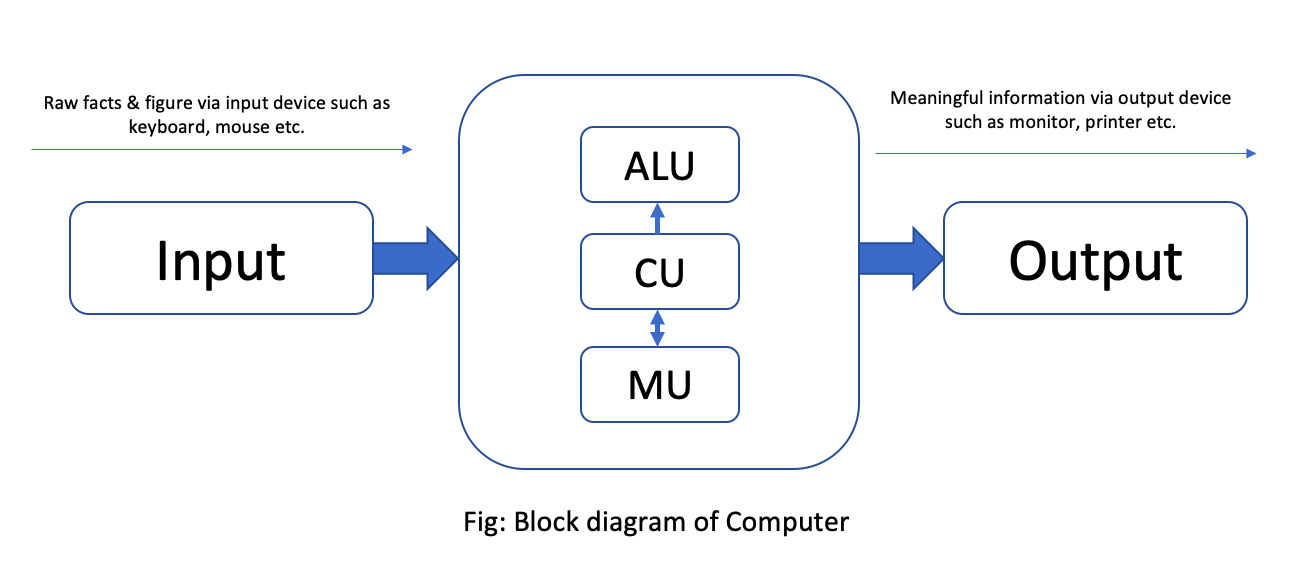
Computer is an electronic device device derived from the Latin word "computere" which means to calculate. It accepts raw facts and figures as an input which are isolated and uninterpreted through input device, process it according to the requirement of the user or command supplied by the user, store it before and after processing of require and produce a meaningful information as an output through an output device. Generally, computer works on IPO (Input-Process-Output) cycle. It follows GIGO (Garbage In Garbage Out) algorithm which means the output is always based on the input supplied by the user. The basic operation of computer is illustrated by following block diagram.

Fig: Block diagram of Computer / Von Neumann Architecture
Some characteristics/features of computer.

The implementation of computers are not only limited/confined to a small area rather they are used from simple domestic task to complex scientific research to engineering. The use of computer are increasing day-by-day due to some special features or characteristics that computer own. Several features of computer are:
Accuracy: Computer are the accurate machine that means result produced by computer are 100% accurate. Since, it follows GIGO. The error that may arise in output is due to human not by a computer.
Speed: Computer works on tremendously high speed. The operating speed of computer are measured in millisecond, microsecond, picosecond and nanosecond which means computer can perform millions and billions of instruction per second.
Storage: It is the area or unit which is capable of storing data and information for present and future use. Storing data allows users to retrieve it whenever required. These days computer comes with high volume of memory which are measured in Megabyte (1024 KB) , Gigabyte (1024 MB), Terabyte(1024 GB) and Petabyte(1024 TB).
Versatility: Computer are generally design to serve more than one type of work. The implementation of computer are not only limited to specific purpose, they solve general requirement of the user and can be used in more than 1 type of job.
Diligence: The feature of computer in which computer doesn't get tired even after working for long period of time. Computer can perform any number of task continuously until it is accomplished. Once the instruction is given computer follows the command till it gets terminated.
Automatic: Computer is an automatic machine. Once the instruction is generated it perform accordingly until command is terminated. We don't have to issue continuous command in order to operate the computer. This is called automatic.
Applications/Implementations/Uses of computer

The uses of computer are increased day by day. Every aspect if human life is highly influenced by computer. From simple domestic use to complex engineering and scientific solutions, computer can be used. This is due to the versatility of computer. Some of the basic implementation of computer are:
Education: Nowadays, computer are highly used in teaching and learning process. Many interesting graphics can be made and provided for easy learning. Also, computer provide features of internet which make learning easy and fun.
Communication: Computer is massively used in communication. Communication is done by e-mail, chat, online conferencing. e-fax etc with help of internet in computer. It has made the communication faster, easier and cheaper.
Business: In business sector, computer are used to generate invoice, maintain stock and make statistical analysis. E-commerce is the new and emerging way of buying and selling goods and service through used of electronic means and media.
Engineering and designing: Scientific and engineering design requires complex and massive computations. Design of bridges, towers, buildings, generators, motors, electrical transmission etc requires precise computation which are done through computers.
Science and research
Military
Industry
Medicine
Robotics
Transportation
Capabilities and Limitations of computer (Pros and Cons)

Capabilities/Advantages/Merits/Pros of computer:
Computer is capable of handling larger volume of data and can store huge amount of data.
Computer can perform millions of instruction within a limited time frame with same speed and accuracy.
Computer are used to fulfill the general requirement of user.
It provides faster and cheaper way for communication.
Computer are used to solve complex and critical situation in which involvement of humans are almost impossible.

Limitations/Disadvantages/De-merits/Drawback/Cons of computer:
Computer is a dull machine, it cannot make their decision on their own.
Computer requires electricity or battery in order to operate.
It can affect human eye, when used for long period of time.
It requires several peripheral devices and software to run.
It cannot think, learn or react as human.
It cannot draw conclusion and provide feedback.
Generations of computer.

History of computers dates back to mechanical era where computer were not used for general purpose. It takes long period of time to come to this phase. Development of computer had passed through different era from mechanical to electro mechanical to digital computer. The development in different electronic components, precise engineering and hi-tech technology has change the operation of computer drastically. Earlier computer were only used for specific purpose such as counting and performing basic mathematical operation. Later on, due to the necessity and requirement of user different general purpose computer were developed. Therefore, the classification of computer on the basis of major electronic component, their architecture and modes of operation is known as generations of computer. Five different generations of computer are listed below along with their distinct features.

1. First generations computer (1946-1958 )
They used vacuum tubes as their basic electronic components used to control and amplify electronic signals.
They were big in size, consume more electricity and generate large amount of heat thus required air conditioning system to keep device cool.
They were unreliable and were prone to frequent hardware failure.
They were normally not used for commercial purpose.
Machine level language was used to program these computers.

eg: ENIAC, EDVAC, EDSAC, UNIVAC

2. Second generations computer (1959-1964 )
They used transistors as their basic electronic components.
They were small in size as compared to first generation thus consume less electricity and generate less heat.
They were less prone to hardware failure thus more reliable.
They were not also for commercial purpose because production was difficult and costly.
Assembly language were used to program these computers.

eg: IBM 7000, IBM 1401, IBM 1620, NCR 304, MARK III, ATLAS

[Note: First computer brought in Nepal was IBM 1401 for population census of 2028 BS]


3.Third generations computer ( 1965-1974 )
They used Integrated Circuits (IC) as their basic electronic components.
They were smaller in size, consume less electricity and generate less amount of heat.
They were faster and more reliable compared to first and second generations.
They were widely used for the commercial application all over the world.
High level language were used to program these computers.

eg: PDP-8, PDP-11, ICL 2900 series, IBM 360, IBM 370

4. Fourth generation computer (1975-1990)
They use VLSI ( Very Large Scale Integrated Circuits ) as their main electronic components.
There size were drastically reduced and hence were they were much more portable.
They were faster in processing and were much more reliable.
They have larger memory up to GB and TB.
They use different advance high level language to program this computer.

eg: Apple Macintosh, IBM PC

5. Fifth generation computer (1990-onwards)
They use ULSIC (Ultra Large Scale Integrated Circuit) or Microprocessor as their major electronic components.
They have or will have artificial intelligence.
They have tremendously high processing unit due to parallel processing.
They are capable of image processing, speech or voice recognition.
They use different high level language to program this computer.
Introduction to computer system

The word system refers to the integration of several individual independent unit which are integrated together to achieve a common objective or goal. System is a set of detailed method, procedure and routines created to carryout a specific activity, performs a duty or solve a problem. In a system different unit co-ordinate with each other so that they work as a whole. Without any of the unit whole system is affected.
Similarly. computer system is also a Combination on hardware, software and peripherals which are organized together to run our computer system smoothly. Basically, our computer System works on IPO (Input Process Output) cycle. So, it is mandatory/compulsory to have different unit work together as a whole in order to convert raw facts and figure into meaningful information. Without any one of these unit computer starts malfunctioning.
The design, arrangement, construction or organization a different parts of computer system is known as computer architecture. It is the conceptual design and fundamental operational structure of a computer system. It is a framework which focus in how CPU performs internal operation. So computer architecture may also be define as the science and art of selection, inter connecting hardware components to create computer to meet functional performance and cost.
Components/Elements of Computer System

A Computer System has several have several basic components or elements which are listed below:
1. Hardware ( Input, Output, Processing and storage )
2. Software
3. Data/Information
4. Procedure
5. People
6. Communication


Hardware: Hardware is the physical devices on the computer which we can touch and see With out hardware, software cannot work it include input device, output device, processing device and storage device for example: device like keyboard, mouse, CPU, hard disk and RAM are commonly used hardware devices.
Software: The collection set of instruction is known as program.which performs some specific function. These programs are integrated together in order to work as a software. Software describes how hardware should function and helps in popper utilization and mobilization of computer hardware.For eg. Operating system, MS-Office, Billing software etc.
Data/Information: The raw facts and figures that are isolated, uninterpreted, and doesn't give any sense is known as data. Data are fed into the computer for processing as a input though Input devices. Whereas, the meaningful result obtained after processing data according to the supplied instruction is known as information. Information generally are the processed version of data which are obtain as output through output device.
People/User: It is the most important part of the computer system. People operate the computer hardware and create the computer software. People helps to generate command to operate the computer system. Without user no hardware and software can be mobilized.
Procedure: Procedure are the description of how things are done.It includes steps for converting raw fact and figure into meaningful information. It include the general guidelines of how computer should be used.
Communication: Once the computer system is setup, there is tremendous amount of data flow between user to computer and vice-versa. The data are shared among different components of our computer System in the form of electronic signal. The exchange of data and information between several components can also be termed as communication.
Basic hardware components of a computer system.

1. Input unit
2. Output unit
3. Processing unit
4. Storage unit

Input Unit: Data and instruction must enter the computer system before any computation can be perform on the supply data. Input device accepts data and instruction from the user, hence the device or the unit which is used to fed raw facts and figures to the computer system for processing along with set of instruction is called input unit.
It also converts input data into suitable form that is accepted by the computer System. Generally, it act as a interface/bridge or medium through which communication between user and computer takes place. In short following are the functions performed by the input unit
1. It accepts the list of instruction and data from the outside world.
2. It converts the supplied instruction and data into computer acceptable form that is binary code.
3. It supplies the converted instruction and data to the computer system for further processing.
Some of the commonly used input device are:
Keyboard , track pad, touchscreen, mouse, light pen, scanner, BCR, MICR, OCR, joystick ,trackball etc

Output Unit: The job of an output unit is just the reverse of an input unit. It supplies information and result of computation to the outside world. Thus, it links computer with the external environment. It consists of device that translate information processed by the computer into a form that human can understand. The computer processed information consist of Os and 1 which need to be translated into letters, numbers, special symbols, pictures etc that people can understand. In short following are the function performed by an output unit:
1. It accepts the result produce by the computer which is not understandable to us.
2. It converts the result into human understandable form.
3. It supplies the converted results to the outside world.
Commonly used output device are:
Monitor, printers, speakers, plotters etc.
There are two types of output device.
i. Hard Copy output
ii. Soft Copy output

Hard copy output: These type of output are in print form on the paper or some material that can be touched and carried for being shown to other. It is permanent in nature. So that we can look after these output even there is no computer. Unlike soft copy output, these type of output does not need continuous supply of power. for example, Output produce in paper or other material by printer or plotter is known as hard copy output and the device is known as hard copy output device. The commonly used hard copy output devices are printer and plotter.
Soft copy output: Soft copy output refers to the data shown on display screen or produced by speaker. These type output is untouchable. It is temporary in nature that means, output cannot be carried for being shown to others. These types of output resides only when there is computer or continuous electric supply. It is non-portable compared to hard copy output. for example, Output produced on display screen or sound produced from speaker are soft copy output and whereas the device is known as soft copy output device. The commonly used soft copy output devices are speaker and monitor.
Q. Differences between impact and non-impact printers?

(Important question of NEB 11 board exam)
Impact printer Non-Impact Printer
1. It uses electro-mechanical mechanism that causes hammers or pins to strike against a ribbon and paper to print the text 1. It uses thermal, chemical, electrostatic, laser beam or ink jet technology for printing the text and images.
2. It is slow while printing. 2. It is fast while printing.
3. It uses force for printing and produces more sound while printing. 3. Since it doesn't use force for printing it produces less sound while printing.
4. It cannot print graphics perfectly. 4. It can print graphics perfectly.
5. It is usually single colored. 5. It can be single or multi-colored.
6. It is rarely used at present. 6. It is widely used at present.
examples: Dot matrix printer, Typewriter etc. Examples: Ink jet printer, laser printer etc


Central Processing Unit: The CPU is brain of any computer system. Like in human body, all major decision are taken by the brain Similarly, in computer all major calculation and comparison are made inside the CPU and CPU is also responsible for activating and controlling the operation of other unit of a computer system A micro processor is a single chip that performs the function of CPU in micro-computers. The speed of the microprocessor is measured in terms of Megahertz and Gigahertz. The functions of CPU (processor) are:
out processing command and co-ordinate with all other parts of computer System:
i. To carry out processing.
ii. To give command and co-ordinate with all other parts of computer system.
iii. To control the sequence of operation that takes place in our computer system.
iv. To helps in memory allocation and controls storage of data and instruction.
The central processing unit consists of unit.
1. Arithmetic logic Unit (ALU)
2. Control Unit (CU)
3. Memory Unit (MU)

ALU: ALU stands for Arithmetic Logic Unit. It is one of the most important unit of processing. Where actual execution of the instruction takes place during processing. It performs arithmetic and logical operations and controls speed of those operations as directed by control unit(CU). To be clear all the calculation and decision are made in ALU. The data and instruction are stored in the primary memory before processing, and are transferred when needed to the ALU. ALU is designed to perform fundamental mathematical operations such addition, subtraction, multiplication, division and logical Operation which perform Comparison between the two or more than two operands to make a solid decision also known as logical operation which consists of logical OR, logical AND and logical NOT.

CU: Although, control unit doesn't perform any actual processing on the data , it acts as a central nervous system for other component of the computer. It manages and co-ordinate the entire computer system. It obtain instruction from the program stored in the main memory, interprets the instruction accordingly and issue signal that cause other unit of the system to execute them. Basically, it controls overall operation of the computer. It also controls all other device input/output device connected to the CPU. It directs the movement of electrical signal between main memory to ALU and input-output device. Hence, control unit acts as the nerve system of the computer system.

MU: Memory unit is responsible for storing data and instruction either for short or longer period of time. Basically memory unit stores data and instruction before and after processing . As we know, memory are needed for program being currently used or to store data and instruction permanently . Depending upon the nature of data stored memory unit are distinguished into primary memory and secondary memory. Memory unit of CPU is a primary memory where data and instruction are stored temporarily. Where as the processed data and information can be stored in secondary memory permanently so that user can retrieve information whenever required. There are two types of memory used in our computer system.
1. Primary memory/Main memory
2. Secondary memory/Auxiliary Memory
1) Primary Memory/Main Memory:

Primary Memory is also known as main memory of computer. This is the place where our data and instruction are stored before processing and the result are stored before displaying output. Memory which stores data and information currently being used by the computer is known as primary memory.

Features of primary memory:

1. It is not used to store data permanently.

2. It is usually volatile except ROM.

3. It is usually expensive and faster than Secondary storage.

4. It is normally used for smaller storage.

5. It is not used to transfer data from one computer to another computer.

6. It is made up of semiconducting material.

There are two type of Primary memory.

1.1) RAM: RAM stands for Random Access Memory, which stores data and instruction temporarily. It is also known as volatile memory that means data and instruction written in RAM gets erased away when electric power is c.ut off. A user can read as read from it and write in it. Hence, it is also known read-write memory. There are two types of RAM.

SRAM: It stands for Static Random Access Memory. It is made up of transistors. It is called static because it can remember its memory content without being refreshed or as long as there is power. SRAM doesn't need periodic refreshment like DRAM. It is faster than DRAM but more consume more electricity.

DRAM: It stand for Dynamic Random Access Memory. It is made up of capacitors. It is called dynamic because it needs periodic refreshment and can remember its memory content only after being refreshed as long as there is electric charge in a capacitor. It consume less electricity and is less expensive but is slower than SRAM.

1.2) ROM: ROM stands Read Only Memory where data and information are stored permanently. It is also known as non-volatile memory as data and instruction remain even after there is no power supply. Data are stored in ROM during manufacturing time. The program present in ROM is called firmware and is responsible to boot the computer. The types of ROM are:

PROM: It stands Programmable Read Only Memory. Initially, it is a blank chip which can be written or program only once by using a special machine called ROM burner. Once the PROM is written it cannot be modified and becomes ROM.

EPROM: It stands Erasable Programmable Read Only Memory. It is a special chip which can be reprogrammed to recond different information. The data and information are erased by exposing it to the intensive ultra violet light.

EEPROM: It stands for Electrically Erasable Programmable Read Only Memory. This type of chip can be erased and reprogrammed repeatedly with special electric pulses. It doesn't require special device to write onto it. EEPROM can be re-programmed without removing it from the computer.
2) Secondary Memory/Auxiliary Memory:

Memory which stores data and information permanently for future reference is known as secondary memory. It is a permanent memory where data and instruction remains forever. It is also known as non-volatile memory in which data and instruction remains even if there is no electric supply. This type of memory is also known as auxiliary memory. It has a huge storage capacity up to Gigabytes, Terabytes or even more. Different secondary storage media used are: Magnetic storage, Optical storage and Flash storage.
2.1) Magnetic Storage: It is a storage media in which data are stored in the form of magnetic spot. A coating of magnetic metal oxide like ferric oxide is done over the disk which attracts the data to be deposited over them. Data are stored in the form of magnetic pattern. Some of the magnetic storage media are: Magnetic tape, Floppy disk and so on.
Hard disk: It is secondary storage device of Computer. It is an air-tight sealed consisting of number of magnetic disk (Platters) mounted on a spindle. It was introduced by IBM in 1956 AD. It was first called Winchester disk.Unlike floppy disk it cannot be bend so it is known as hard disk. It is mainly used to store huge volume of data and programs permanently so it is known as non-volatile memory. The disk is divided into the number of concentric circle called tracks and this tracks is divided into invisible segments called sector.

Floppy disk: It is a round and flat disk made up of Mylar (Plastic material) coated with magnetic material. It is read-write memory as we can read from it as well as write onto it. We can access information from a floppy disk randomly randomly. It has very small storage compare to hard disk.
2.2) Optical Storage: is also non-volatile secondary storage media. It is a flat round disk made up of plastic poly carbonate material coated with aluminium alloy. A very fine laser beam is projected to read and write data from and onto the disk. Some commonly used optical storage is CD-ROM, DVD and Blu-Ray (BD). The different types of optical storage are:
CD-ROM: It stands for Compact Disk- Read Only Memory. It is a optical storage media as it use laser beam to access data from the disk. It can store up to 700mb of data and are useful to store large amount data like computer software, audio, video movies etc. Other types of CD-ROM are CD-R and CD-RW.

DVD: DVD stands for digital Digital Versatile Disk or Digital Video Disk. It is also a type of optical memory which can store very large amount of data and information almost six times more than CD. It is also considered as improved form of CD-ROM and use same technology as that of CD-ROM for reading and writing data.

2.3) Flash Memory: It is a non-volatile. erasable and programmable solid state memory which is made up of Semi- Conductor chip. It was first introduced in mid 1980's by Fujio Masuaka in Toshiba Corporation of Japan It can be re-programmed at high speed and hence the name flash. It is derived from EEPROM. In Flash entire memory can be eased in a few second by using electric technolgy. Examples memory card, pen-drive etc.
Classification of computer on the Basis of Size

As we know, technological development and precise engineering had drastically reduce the size of computers. Development of various electronic components are the major cause for reducing the size of the computer. Different types of computer on the basis of size are:

Super Computer: This computer are one of the fastest and powerful digital computer which can perform only a particular types of jobs such as weather forecasting, rocket launching, population counting etc. They were tremendously huge in size and are very expensive. Due to this reason they are not commercially successful. They are used by large corporations and government agencies. They were large in size hence, it occupy much more space and require temperature controlled room.

Mainframe Computer: This computer are also largest, fastest and perhaps one of the most expensive computer. Super computer are much more powerful and expensive but they are similar in size with mainframe computers. These computers have high processing unit and large storage capacity. This computer have multiple terminal. This computer can do big capacity of processing tasks such as population census, agro census, SLC result processing, governmental offices, industries etc. The first computer bought in Nepal in 2028 BS was IBM 1401, which was also a mainframe computer. This computer was bought in Nepal for population counting. Moreover, second computer bought in Nepal was ICL 2950/10 in 2038 BS which was also a mainframe computer brought for same purpose.

Mini Computer:This computer are smaller than mainframe computer and are more powerful and expensive compare with micro-computer. They use terminal and are connected with more than 50 terminal at a time. Hence, it can handle much more amount of input and output than micro computer. The capability of mini computer is somewhere in between mainframe and micro computer. So, they are often called mid-range computer. This computer are used for medium size business, industries, universities, banks due to easy operation than mainframe computer. Eg, Data general, NECK, MAGNUM

Micro Computer: These are the smallest computer develop till date they use micro-processor as their major processing unit. Hence, they are called micro-computers. This computer are small and low cost digital computer. They are also called home computer or personal computer. This days we can find various micro computer that has various processing speed, storage, capacity and size according to cost. They are normally used in office, home, school, shop etc. Micro Computer are also found in various shape and size. They are desktop, Laptop and palmtop.

a. Desktop: They are the personal computer which use micro-processor as a single chip processing unit normally called CPU whose size are so small that they accommodate in a desk of a user. Desktop also have various range of personal computer having several processing speed, storage, capacity and other features. This computer are out popular computer this days. So that, they are used in various commercial field such as school, home, office, business and so on.

b. Laptop: This computer are highly portable micro computers and can be carried from one place to another easily like briefcase. They are so small that they can be fixed in a lap of a user and hence they are called laptop. They are mostly popular among traveller and the business man. We have to move from one place to another place for work and different reasons. Since, laptop comes with battery backup, we don’t need to have direct A.C. supply. So, we can use without direct connection of electricity. It high reliability, portability and flexibility.

c. Palmtop/Handheld: These are the most portable and smallest device that are develop till date. They are so highly portable that they can be carried easily inside the pocket of the user. Due to small in size they can be adjusted within the palm of the user. So, they are called Palmtop. Several tablets, PDA (Personal Digital Assistant), smartphones are commonly used palmtop these days. This device also gave huge range of application ranging from game playing, internet surfing, and other official needs and requirement. This device also comes with battery backup.

Mobile computing

  Contempory WHAT IS CLOUD COMPUTING? Cloud Computing is the use of hardware and software to deliver a service over a network (typically the...